


Xb Bargains
4.6242.00 Reviews
App Specs
- Version
- 2.1.344
- Updated On
- License
- Free
- Downloads
- 1,000,000+
- Developer
- SP Soft s. r. o.
- Categories
- Shopping
- Platform
- Android
Screenshots
 Analysis by AppCompare
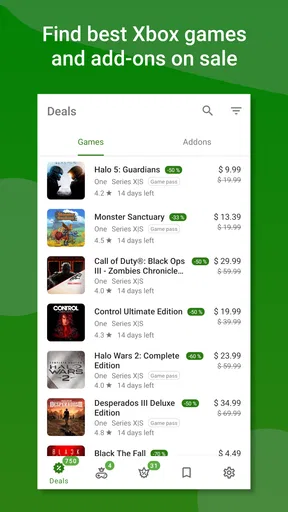
I judge a deal-finding app less by how busy its home screen looks and more by whether it helps me make a sensible purchase without turning shopping into another daily chore. Xb Bargains is aimed at Xbox players who would rather wait for a game they want than pay full price on impulse. Its appeal is practical: keep an eye on prices, save interesting titles to a wishlist, and check back when buying makes sense.
Who gets the most from a focused Xbox deal tracker
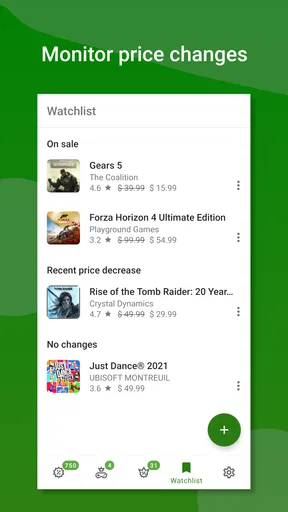
I’d consider this a useful companion if you already know which Xbox games you want but are flexible about when to buy them. A wishlist is especially handy when your interest is spread across several titles: instead of trying to remember which game you saw on sale, you can keep your candidates together and use price changes as a reason to revisit them. That makes the app more useful for patient shoppers than for someone browsing just to see what looks interesting today.
It also suits people who don’t want to keep opening a store page to check whether a price has changed. A tracker can make that routine more deliberate: add a game when you’re interested, then let the app help you notice when it may be worth checking again. I’d still treat a notification as a prompt to review the purchase, not a command to buy. A discount only saves money when it’s for a game you genuinely planned to play.
Small setup choices that make the app more useful
When I set up any wishlist-based bargain routine, I try to add only games I would realistically buy. That keeps the list readable and helps a price drop stand out instead of becoming one more alert among many. I’d also use clear personal priorities: a game I’m ready to start can sit at the top of my mental shortlist, while a title I’m merely curious about can wait. This simple habit makes price tracking less noisy.
If you’re deciding whether to install it, the basics are reassuring: it’s a free shopping app from SP Soft s. r. o., with a Teen content rating, and it has a 4.6 average from around 7,300 ratings. It has passed 1 million installs, which suggests plenty of players have found a reason to try it. The current version is 2.1.344, and it runs on Android 7.0 or later. Optional in-app purchases are listed at about $1.49 to $2.99 per item, so I’d check what an offered purchase covers before paying; the app itself costs nothing to download.
What a price alert can—and cannot—tell you
The useful part of a price alert is that it can bring a possible buying opportunity back to your attention. It doesn’t decide whether the game is right for you, whether you have time to play it, or whether the current offer fits your budget. I’d compare the alert with my own plan and check the purchase details in the relevant store before acting. That extra pause helps prevent the familiar trap of buying something only because it looks temporarily cheaper.
There’s also a difference between tracking a price and comparing every possible way to play. If you already rely on a console store’s own browsing tools, those may be enough for occasional checks. The advantage of a dedicated tracker is having a wishlist-centered place to monitor interest over time; the trade-off is that it becomes another app to maintain. For someone who buys games rarely, a note on a phone or an occasional store visit may be simpler. For a player keeping tabs on several planned purchases, a focused tracker can be easier to revisit.
Worth Reading Before You Choose

EA SPORTS FC Mobile 26 Is a Bigger Football Game, but It Takes Time

Flipboard Shows What News Apps Must Do Beyond the Feed

Switching to Android Auto Means Rethinking Your Driving Routine

Google Calendar Makes a Crowded Week Easier to Manage

Ludo King Makes the Most of the Minutes Between Plans

Baby Panda World Brings Quick Play to Modern Phones, but Its Game Library Feels Busy
When the routine gets stuck
If a game you expected to track isn’t showing the change you anticipated, I’d first check that I added the correct title and that I’m looking at the same edition or offer I meant to follow. Similar names and different versions can make a deal look confusing, so it’s worth slowing down before assuming the app has missed something. I’d also reopen the app and review the item rather than relying solely on an old notification.
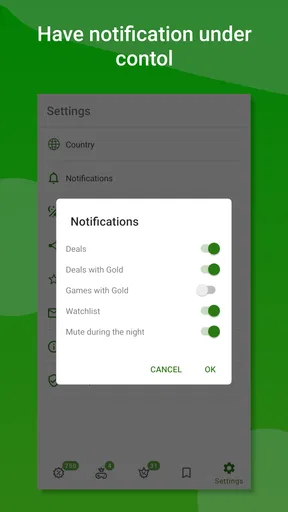
If alerts don’t appear, I’d check the app’s notification settings on the phone and confirm that notifications are allowed. Then I’d open the app directly and look at the wishlist. This separates a possible alert-delivery issue from the more important question of whether the tracked item itself has changed. I wouldn’t assume that a quiet phone means there are no deals; checking the list manually is a sensible fallback when timing matters.
A realistic way to use it without overspending
Imagine you’ve finished one game and have a few Xbox titles in mind for later, but none is urgent. I’d add those titles to the wishlist, decide which one I’d actually play next, and leave the others as lower priorities. If a price change brings one back to my attention, I’d check the offer and ask whether I still want it. That short routine turns the app into a buying aid rather than a reason to browse and spend more.
For households sharing a console, it can help to agree on what counts as a worthwhile purchase before adding lots of possibilities. A lower price doesn’t resolve questions such as who wants to play the game or when there will be time for it. The app can keep an eye on a price, but the final decision still benefits from a quick conversation and a look at the household’s actual plans.
Compared with general shopping apps, its Xbox focus is a strength if games are what you’re tracking: the purpose is clearer than a broad feed covering unrelated products. The flip side is equally clear. It isn’t the right choice for finding discounts on clothing, electronics, or groceries, and it won’t replace a general retailer app for those purchases. I’d use it alongside the places where I actually complete a transaction, rather than expect one app to handle every stage of shopping.
First Impressions: A Shopper’s Paradise
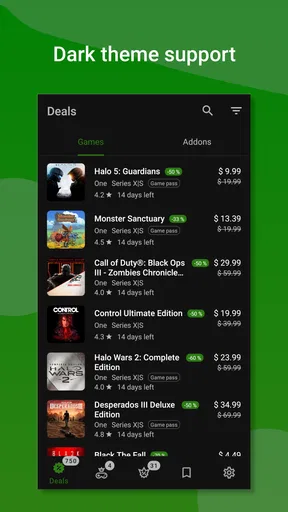
From the moment I launched Xb Bargains, I was greeted with a sleek and intuitive interface. It's like the app just gets me. No unnecessary frills, just a straightforward platform that makes bargain hunting feel like a breeze. The homepage is neatly organized, showcasing the latest deals in a way that’s easy on the eyes. And let me tell you, the variety is impressive. From electronics to fashion, and even home goods, it’s all there.
Features That Make You Go Wow
One of the standout features is the app’s smart notification system. You can customize it to alert you when an item you're interested in drops in price. No more obsessively checking every hour; just let the app do the work for you!
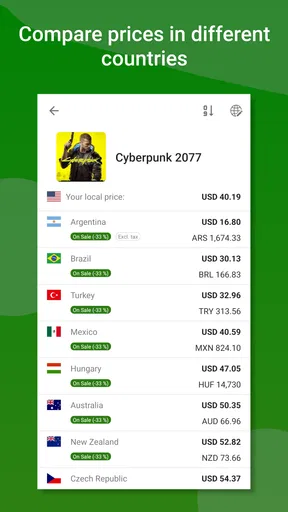
Another cool feature is the price comparison tool. I tried it out with a pair of headphones, and it instantly showed me prices from different retailers. It’s like having a personal shopping assistant at my fingertips. Plus, the app includes user reviews, so you can get the lowdown from fellow bargain seekers before you commit to a purchase.
Navigating the App: Easy Peasy
Navigation is butter smooth, and I didn’t encounter any bugs or glitches during my time with the app. The search function is efficient, and the filters allow you to narrow down options based on your preferences. I especially loved the "Trending Deals" section, where you can see what's hot and happening in the bargain world.
One thing to note is that while the app itself is free, some premium features require a subscription. However, the basic version offers plenty of functionality for casual users.
What Sets It Apart?
In a market flooded with shopping apps, Xb Bargains stands out for its user-centric design and reliability. The app doesn’t bombard you with ads, and the deals are genuinely worthwhile. I found myself checking in daily, curious to see what new treasures I could uncover.
"It’s like having a Black Friday every day."
Moreover, the community aspect of the app is a nice touch. Users can share tips and tricks on maximizing savings, creating a collaborative environment that adds to the overall experience.
Final Thoughts: A Must-Have for Deal Hunters
All in all, Xb Bargains is a fantastic tool for anyone looking to stretch their dollar further. Whether you’re a seasoned shopaholic or just someone who loves a good deal, this app is worth a spot on your home screen. While there are minor improvements that could be made—like expanding the database of retailers—the overall functionality and user experience are top-notch.
If you’re ready to transform your shopping habits and save some serious cash, give Xb Bargains a try. Who knows? You might just find that dream deal you’ve been waiting for.
Pros
- User-friendly interface for easy navigation.
- Real-time updates on the latest deals.
- Wide range of categories for all needs.
- Customizable notifications for specific interests.
- Secure login and data protection.
Cons
- Frequent ads can disrupt browsing experience.
- Limited availability in some regions.
- Occasional glitches in the search function.
- Requires internet connection for updates.
- No offline access to saved deals.
FAQs for Xb Bargains
What is Xb Bargains and how does it work?
Xb Bargains is an app designed to help users find the best deals and discounts on a variety of products. By aggregating offers from multiple retailers, it allows users to compare prices and snag the best bargains. Simply browse through categories or search for specific items to view available deals.
Is Xb Bargains free to use, or are there any hidden costs?
Xb Bargains is free to download and use. The app does not charge users for accessing deals or comparing prices. While there are no hidden fees, some deals may require users to create an account with the retailer or meet certain purchase conditions to avail discounts.
How frequently are new deals updated on Xb Bargains?
Deals on Xb Bargains are updated regularly to ensure users have access to the latest offers. The app pulls in new deals daily, so users are encouraged to check back often to find fresh bargains. Notifications can also be enabled to alert users to the best new deals.
Does Xb Bargains support international deals or is it region-specific?
Xb Bargains primarily focuses on deals available in specific regions, depending on the user’s location settings. While some international deals may appear, the app is optimized for local bargains. Users should ensure their location settings are correct to access the most relevant deals.
Can I trust the deals and retailers featured on Xb Bargains?
Xb Bargains partners with reputable retailers to ensure users can trust the deals provided. The app aims to feature verified offers and retailers. However, users should always check retailer reviews and terms of service for each deal to ensure they meet their expectations and requirements.


